Formatos padrões
Standard formats
Formatos estándar
- ARROBA
- ARROBA EXPANSÍVEL
- ARROBA EXPANSÍVEL VÍDEO
- ARROBA VÍDEO
- BILLBOARD
- HALF PAGE
- HALF PAGE EXPANSÍVEL
- HALF PAGE EXPANSÍVEL VÍDEO
- HALF PAGE VÍDEO
- SUPERBANNER
- SOCIAL ADS
WALLPAPER
| Descrição | Formato especial que é exibido em toda a área ao redor do conteúdo do site. | Special format that is displayed throughout the area around the website content. | Formato especial que se muestra en toda el área alrededor del contenido del sitio web. |
|---|
| ADOROCINEMA / MINHAVIDA / MGG / TUDOCELULAR | ||||
|---|---|---|---|---|
| Dispositivo | Peças | Tamanho | Área Quente | Peso Máximo |
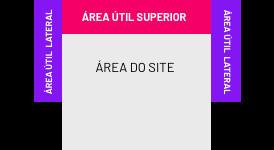
| Desktop | Wallpaper | 1800x1000 px | Laterais: 162x626 px Superior: 1024x230 px |
700 kb |
| Tablet | Billboard | 970x250 px | Total | 250 kb |
| Mobile | Banner | 320x100 px | Total | 100 kb |
| Download da template desktop | Download desktop template | Descargar plantilla de escritorio | ||
| PUREPEOPLE | ||||
|---|---|---|---|---|
| Dispositivo | Peças | Tamanho | Área Quente | Peso Máximo |
| Desktop | Wallpaper | 1800x1000 px | Laterais: 179x626 px Superior: 990x230 px |
700 kb |
| Tablet | Billboard | 970x250 px | Total | 250 kb |
| Mobile | Banner | 320x50 px | Total | 100 kb |
| Download da template desktop | Download desktop template | Descargar plantilla de escritorio | ||
| TUDOGOSTOSO | ||||
|---|---|---|---|---|
| Dispositivo | Peças | Tamanho | Área Quente | Peso Máximo |
| Desktop | Wallpaper | 1800x1000 px | Laterais: 119x626 px Superior: 1000x264 px |
700 kb |
| Tablet | Billboard | 970x250 px | Total | 250 kb |
| Mobile | Banner | 320x50 px | Total | 100 kb |
| Download da template desktop | Download desktop template | Descargar plantilla de escritorio | ||
| IGN | ||||
|---|---|---|---|---|
| Dispositivo | Peças | Tamanho | Área Quente | Peso Máximo |
| Desktop (3 peças estáticas ) |
Background | 3840x2160 px | Nenhuma | 400 kb |
| Sidebar | 320x180 px | Total | 200 kb | |
| Billboard | 970x250 px | Total | 250 kb | |
| Tablet | Billboard | 970x250 px | Total | 250 kb |
| Mobile (2 peças estáticas) |
Mobile Banner | 320x100 px | Total | 100 kb |
| TopBar | 50x50 px | Total | 100 kb | |
| Template indisponível no momento | Template currently unavailable | Plantilla no disponible actualmente | |||||||||
| OBS: Todas as peças devem ser estáticas, HTML não permitido. | Note: All creatives must be static; HTML not allowed. | Nota: Todas las piezas deben ser estáticas; no se permite HTML. | |||||||||
| Testador de Wallpaper: | Demonstração da área útil: |
|---|---|
| Clique aqui |
|
| Portais presentes | Adorocinema, Minha Vida, MGG, Purepeople, TudoGostoso, IGN, TudoCelular |
|---|
RECOMENDAÇÕES E BOAS PRÁTICAS
1. Otimize ao máximo o peso dos arquivos, quanto mais leve, mais rápido a peça irá carregar (O peso total do criativo é o peso de todos os arquivos locais somado do peso de todos os arquivos e recursos acessados externamente).
2. Sempre enviar as peças HTML em um arquivo ZIP contendo todos os arquivos dependentes, como HTML,CSS, JS, GIF, PNG, SVG ou JPEG.
3. Evitar chamadas externas e, se absolutamente necessário, usar links seguros (https com certificação SSL).
4. Evite usar bibliotecas externas como JQuery e players de vídeo.
5. Respeite as áreas quentes e frias das peças para evitar que a arte não se encaixe em nossos sites.
2. Sempre enviar as peças HTML em um arquivo ZIP contendo todos os arquivos dependentes, como HTML,CSS, JS, GIF, PNG, SVG ou JPEG.
3. Evitar chamadas externas e, se absolutamente necessário, usar links seguros (https com certificação SSL).
4. Evite usar bibliotecas externas como JQuery e players de vídeo.
5. Respeite as áreas quentes e frias das peças para evitar que a arte não se encaixe em nossos sites.
RECOMMENDATIONS AND BEST PRACTICES
1. Optimize the file weight to the maximum extent possible; the lighter it is, the faster the asset will load. (The total weight of the creative is the sum of the weights of all local files plus the weight of all externally accessed files and resources).
2. Always send HTML creatives in a ZIP file containing all dependent files, such as HTML, CSS, JS, GIF, PNG, SVG, or JPEG.
3. Avoid external calls and, if absolutely necessary, use secure links (https with SSL certification).
4. Avoid using external libraries such as JQuery and video players.
5. Respect the hot and cold areas of the creatives to prevent the art from not fitting into our sites.
2. Always send HTML creatives in a ZIP file containing all dependent files, such as HTML, CSS, JS, GIF, PNG, SVG, or JPEG.
3. Avoid external calls and, if absolutely necessary, use secure links (https with SSL certification).
4. Avoid using external libraries such as JQuery and video players.
5. Respect the hot and cold areas of the creatives to prevent the art from not fitting into our sites.
CLICK TAG
1) Nomear o elemento clicável como "click-area"
1) Name the clickable element as "click-area"
1) Nombrar el elemento clickeable como "click-area"
Ex:
<a href="#" id="click-area">
2) Inserir o script abaixo no final do <body>
2) Insert the script below at the end of the <body>
2) Insertar el script a continuación al final de <body>
    <script type="text/javascript">


      var url = window.location.href;

      var clickTag = url.substring(url.indexOf("click=")+6,url.length);
      document.getElementById("click-area").addEventListener('click', ()=> {
        window.open(clickTag, "_blank");

      });


    </script>